
- 1 Choose your space
-
2 Travel extras
-
3 Personal data
-
4 Review & Confirm
Your Search results
- Entry date
- 24/07/2026 06:00
- Exit date
- 24/07/2026 23:45

Saver
- Convenience right next to the terminal.
- Book online to save money!
- Flexible booking, amendment free of charge.
 <1 min(s)
Cancellations: In case of a cancellation we will retain 10% of your booking price.
Bookings can be cancelled no later than 6 hours before entry to the car park.
Amendments: Booking amendment is free of charge.
Bookings can be modified no later than 6 hours before entry to the car park.
Vehicle restrictions: Vehicles longer than 6 meters or vehicles with a trailer cannot enter this car park.
Parking - frequently asked questions
Budapest Airport’s parking booking system is quick and easy to use. Below we have summarised some information that may be useful to our customers regarding parking and bookings.
- Booking a parking space online
- Financial details
- Managing my bookings
- What to do when entering and exiting the car park
- General parking information
Booking a parking space online
How far in advance can I book?
Parking spaces may be booked at least 6 (six) hours, but not earlier than 12 (twelve) months before the time of entry specified in the booking.
As a result of the booking, any price changes that may occur in the meantime do not apply to you.
What are the shortest and longest parking periods that can be pre-booked?
No booking can be made for a period of less than 24 (twenty-four) hours and more than 60 (sixty) days.
How is the parking fee calculated?
Parking fees apply for 24-hour periods. The number of “days” (24-hour periods) charged as part of a booking is calculated based on the dates and times specified during booking. If, however, the actual time of entry to or exit from the car park differs from the time indicated in advance, and, as a result, the parking period extends into an additional 24-hour period compared to the booking, the parking fee valid for that period in the given car park at that time is payable. Prices are in Hungarian forints and include VAT, at the applicable rate. Budapest Airport Zrt. does not charge any booking or card usage fees.
Why doesn’t the system give me an offer for a certain, preferred car park when I make a booking?
If the system does not give you an offer for a particular car park you have selected when you make your booking, it is likely that there are no parking spaces in that car park available for pre-booking, or the minimum parking period you have specified does not match the conditions of use of that car park.
What should I do if I do not receive the confirmation or an email containing it at the end of the booking process?
In this case, the booking was not successful and the process must be repeated.
If you have successfully made a booking online, but have not received the confirmation email, please check that your antivirus program is not blocking certain emails or classifying certain emails as spam.
Financial details
What payment methods are available?
Budapest Airport’s system accepts MasterCard, Maestro, Visa, Visa Electron and American Express credit cards.
How can I request a VAT invoice?
The online VAT invoice request can be initiated directly in the booking confirmation interface, by clicking on the VAT invoice request button and providing the necessary information for issuing the invoice (company name, company tax number, EU tax number, post code, settlement, address, e-mail address). If the customer fails to request an invoice in the booking confirmation interface, he/she can still request an invoice by e-mail, within 8 (eight) calendar days of the date of the successful completion of the booking, by sending the above data (booking confirmation nr., company name, company tax number, EU tax number, post code, settlement, address, e-mail address) by email to vatprebooking@bud.hu. Invoice requests received beyond 8 (eight) calendar days from the date of successful completion of the booking process will be rejected.
Managing my bookings
How can I be sure that my booking was successful?
Once your booking has been successfully completed, we will send you a confirmation e-mail, with your booking number. If you do not receive a confirmation e-mail, please log in and go to “Change booking” and check the confirmation from the system.
Please make a note of the booking number. This will allow you to check your booking in our system any time before you travel.
Can I cancel my booking if my travel plans change?
You can cancel your booking at least 6 hours prior to the time of entry to the car park, by using the “Change booking” button. In this case, depending on the conditions of the product you have chosen, we will refund a part of the parking fee. Certain products offering a significant discount are exceptions to this; these cannot be cancelled or changed.
Can I change my booking if my travel plans change?
You can change your booking at any time at least 6 hours prior to the time of entry to the car park, by using the “Change booking” button. In this case, depending on the conditions of the product you have chosen, a fee will be charged for the modification. Certain products offering a significant discount are exceptions to this; these cannot be cancelled or changed.
Please note that in the event of a change, the original booking is cancelled and a new confirmation is sent after the change has been successfully made.
Will a fee be charged if I change or cancel my booking?
Yes, if a booking is changed or cancelled, a fee corresponding to a percentage of the parking fee will be charged, which varies for each product. Please check the percentage fee for changing or cancelling the product before selecting it, by clicking on “More info”.
What to do when entering and exiting the car park
What should I do when I get to the entrance of the car park? When you arrive at the airport, please drive to the car park indicated in your booking. At the entrance barrier, wait a few seconds for the system to read and recognise your registration number and issue a parking ticket.
What should I do if I arrive at the car park with a vehicle with a different license plate number than the one indicated during booking, or if the system does not recognise the license plate number specified during booking?
If you arrive at the car park with a vehicle with a different license plate number than the one indicated during booking, or if the system does not recognise the license plate number specified, we recommend that you validate the QR code featured on the parking confirmation, either by scanning it with your mobile phone before the barrier or call the car park customer service directly (24/7), by pressing the telephone icon (request assistance).
If you are arriving in another vehicle and have the QR code, you do not need to change the license plate number in your booking.
What should I do when I return to the car park after my trip?
When exiting the car park, please insert the ticket received at the entrance into the machine at the exit and the barrier will open automatically.
What should I do if my car won’t start in the car park?
Please proceed to the Parking Customer Service in the middle of Terminal Parking and a parking attendant will do their best to help you.
What should I do if my flight is delayed on return?
If your flight is late and you exceed the exit time stated in your booking as a result, you will be charged a parking fee for the period beyond the time stated in your booking, based on the number of 24-hour periods, which will be equal to the parking fee valid in the given car park at that time.
What happens if I exit the car park and then return to it?
You can exit the car park at any time during the booking period, but we will not be able to refund the difference in the parking fee if you leave before the time of departure stated in your booking. If you re-enter the car park, you will be charged the parking fee valid in the given car park at the time of re-entry.
What if I return from my trip earlier than planned, for unforeseen reasons? Will the parking fee for the unused period be refunded?
If you arrive back at the car park before the time of departure stated in your booking, we will not be able to refund the parking fee for the unused period. The exit barrier will open automatically, as if you had left on the last day of your booking.
What happens if I arrive at the car park before the time of entry specified in my online booking?
The system recognises a booking up to 4 hours before the specified time of entry or up to 24 hours after the specified time of departure.
What should I do if my travel plans change, and I want to extend the parking period of my booking after entering the car park?
You can change your booking at least 6 hours prior to the time of entry to the car park. After this time, it is not possible to change the booking, e.g. to extend or cancel it.
What happens if an unforeseen problem arises on the day of my trip; for example, my flight is cancelled? Can my booking be cancelled or modified in this case?
You can change your booking at least 6 hours prior to the time of entry to the car park. After this time, it is not possible to change the booking, e.g. to extend or cancel it.
General parking information
What are the opening hours of the car parks?
All our car parks are open 24 hours day.
How do I find the car park indicated in my booking?
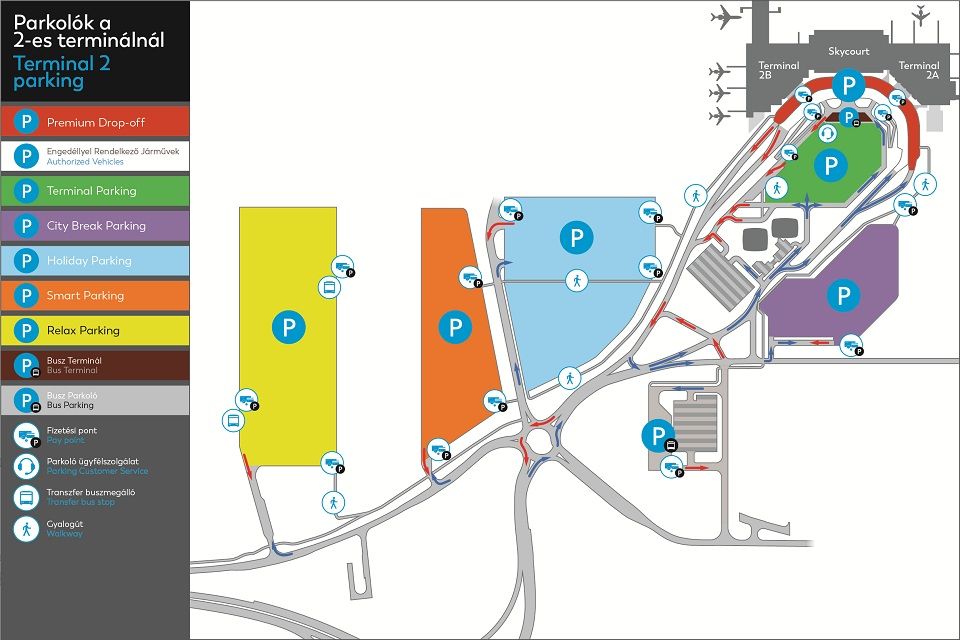
The confirmation document includes a map, showing the location of our car parks and the GPS coordinates of the entrances.
How is it possible to book a parking space for disabled people online?
Parking spaces for disabled people must be booked in the same way as for any other customer. When entering the car park specified in your booking, please drive to the part of the car park closest to the terminal building and look for the disabled parking spaces.
Are there restrictions on the types of vehicles in the car parks?
Vehicles using the car park must be no more than 6 metres long and must not be coupled to a trailer or tow.
How can I submit a complaint about the service?
Please send your complaint to the e-mail address of our car park customer service at parking@bud.hu.

Flex
- Convenience right next to the terminal.
- Book online!
- Flexible booking, amendment free of charge.
<1 min(s)
Cancellations: In case of a cancellation we will retain 10% of your booking price.
Bookings can be cancelled no later than 6 hours before entry to the car park.
Amendments: Booking amendment is free of charge.
Bookings can be modified no later than 6 hours before entry to the car park.
Vehicle restrictions: Vehicles longer than 6 meters or vehicles with a trailer cannot enter this car park.
Parking - frequently asked questions
Budapest Airport’s parking booking system is quick and easy to use. Below we have summarised some information that may be useful to our customers regarding parking and bookings.
- Booking a parking space online
- Financial details
- Managing my bookings
- What to do when entering and exiting the car park
- General parking information
Booking a parking space online
How far in advance can I book?
Parking spaces may be booked at least 6 (six) hours, but not earlier than 12 (twelve) months before the time of entry specified in the booking.
As a result of the booking, any price changes that may occur in the meantime do not apply to you.
What are the shortest and longest parking periods that can be pre-booked?
No booking can be made for a period of less than 24 (twenty-four) hours and more than 60 (sixty) days.
How is the parking fee calculated?
Parking fees apply for 24-hour periods. The number of “days” (24-hour periods) charged as part of a booking is calculated based on the dates and times specified during booking. If, however, the actual time of entry to or exit from the car park differs from the time indicated in advance, and, as a result, the parking period extends into an additional 24-hour period compared to the booking, the parking fee valid for that period in the given car park at that time is payable. Prices are in Hungarian forints and include VAT, at the applicable rate. Budapest Airport Zrt. does not charge any booking or card usage fees.
Why doesn’t the system give me an offer for a certain, preferred car park when I make a booking?
If the system does not give you an offer for a particular car park you have selected when you make your booking, it is likely that there are no parking spaces in that car park available for pre-booking, or the minimum parking period you have specified does not match the conditions of use of that car park.
What should I do if I do not receive the confirmation or an email containing it at the end of the booking process?
In this case, the booking was not successful and the process must be repeated.
If you have successfully made a booking online, but have not received the confirmation email, please check that your antivirus program is not blocking certain emails or classifying certain emails as spam.
Financial details
What payment methods are available?
Budapest Airport’s system accepts MasterCard, Maestro, Visa, Visa Electron and American Express credit cards.
How can I request a VAT invoice?
The online VAT invoice request can be initiated directly in the booking confirmation interface, by clicking on the VAT invoice request button and providing the necessary information for issuing the invoice (company name, company tax number, EU tax number, post code, settlement, address, e-mail address). If the customer fails to request an invoice in the booking confirmation interface, he/she can still request an invoice by e-mail, within 8 (eight) calendar days of the date of the successful completion of the booking, by sending the above data (booking confirmation nr., company name, company tax number, EU tax number, post code, settlement, address, e-mail address) by email to vatprebooking@bud.hu. Invoice requests received beyond 8 (eight) calendar days from the date of successful completion of the booking process will be rejected.
Managing my bookings
How can I be sure that my booking was successful?
Once your booking has been successfully completed, we will send you a confirmation e-mail, with your booking number. If you do not receive a confirmation e-mail, please log in and go to “Change booking” and check the confirmation from the system.
Please make a note of the booking number. This will allow you to check your booking in our system any time before you travel.
Can I cancel my booking if my travel plans change?
You can cancel your booking at least 6 hours prior to the time of entry to the car park, by using the “Change booking” button. In this case, depending on the conditions of the product you have chosen, we will refund a part of the parking fee. Certain products offering a significant discount are exceptions to this; these cannot be cancelled or changed.
Can I change my booking if my travel plans change?
You can change your booking at any time at least 6 hours prior to the time of entry to the car park, by using the “Change booking” button. In this case, depending on the conditions of the product you have chosen, a fee will be charged for the modification. Certain products offering a significant discount are exceptions to this; these cannot be cancelled or changed.
Please note that in the event of a change, the original booking is cancelled and a new confirmation is sent after the change has been successfully made.
Will a fee be charged if I change or cancel my booking?
Yes, if a booking is changed or cancelled, a fee corresponding to a percentage of the parking fee will be charged, which varies for each product. Please check the percentage fee for changing or cancelling the product before selecting it, by clicking on “More info”.
What to do when entering and exiting the car park
What should I do when I get to the entrance of the car park? When you arrive at the airport, please drive to the car park indicated in your booking. At the entrance barrier, wait a few seconds for the system to read and recognise your registration number and issue a parking ticket.
What should I do if I arrive at the car park with a vehicle with a different license plate number than the one indicated during booking, or if the system does not recognise the license plate number specified during booking?
If you arrive at the car park with a vehicle with a different license plate number than the one indicated during booking, or if the system does not recognise the license plate number specified, we recommend that you validate the QR code featured on the parking confirmation, either by scanning it with your mobile phone before the barrier or call the car park customer service directly (24/7), by pressing the telephone icon (request assistance).
If you are arriving in another vehicle and have the QR code, you do not need to change the license plate number in your booking.
What should I do when I return to the car park after my trip?
When exiting the car park, please insert the ticket received at the entrance into the machine at the exit and the barrier will open automatically.
What should I do if my car won’t start in the car park?
Please proceed to the Parking Customer Service in the middle of Terminal Parking and a parking attendant will do their best to help you.
What should I do if my flight is delayed on return?
If your flight is late and you exceed the exit time stated in your booking as a result, you will be charged a parking fee for the period beyond the time stated in your booking, based on the number of 24-hour periods, which will be equal to the parking fee valid in the given car park at that time.
What happens if I exit the car park and then return to it?
You can exit the car park at any time during the booking period, but we will not be able to refund the difference in the parking fee if you leave before the time of departure stated in your booking. If you re-enter the car park, you will be charged the parking fee valid in the given car park at the time of re-entry.
What if I return from my trip earlier than planned, for unforeseen reasons? Will the parking fee for the unused period be refunded?
If you arrive back at the car park before the time of departure stated in your booking, we will not be able to refund the parking fee for the unused period. The exit barrier will open automatically, as if you had left on the last day of your booking.
What happens if I arrive at the car park before the time of entry specified in my online booking?
The system recognises a booking up to 4 hours before the specified time of entry or up to 24 hours after the specified time of departure.
What should I do if my travel plans change, and I want to extend the parking period of my booking after entering the car park?
You can change your booking at least 6 hours prior to the time of entry to the car park. After this time, it is not possible to change the booking, e.g. to extend or cancel it.
What happens if an unforeseen problem arises on the day of my trip; for example, my flight is cancelled? Can my booking be cancelled or modified in this case?
You can change your booking at least 6 hours prior to the time of entry to the car park. After this time, it is not possible to change the booking, e.g. to extend or cancel it.
General parking information
What are the opening hours of the car parks?
All our car parks are open 24 hours day.
How do I find the car park indicated in my booking?
The confirmation document includes a map, showing the location of our car parks and the GPS coordinates of the entrances.
How is it possible to book a parking space for disabled people online?
Parking spaces for disabled people must be booked in the same way as for any other customer. When entering the car park specified in your booking, please drive to the part of the car park closest to the terminal building and look for the disabled parking spaces.
Are there restrictions on the types of vehicles in the car parks?
Vehicles using the car park must be no more than 6 metres long and must not be coupled to a trailer or tow.
How can I submit a complaint about the service?
Please send your complaint to the e-mail address of our car park customer service at parking@bud.hu.

Flex
- Convenience right next to the terminal.
- Book online!
- Flexible booking, amendment free of charge.
2-4 min(s)
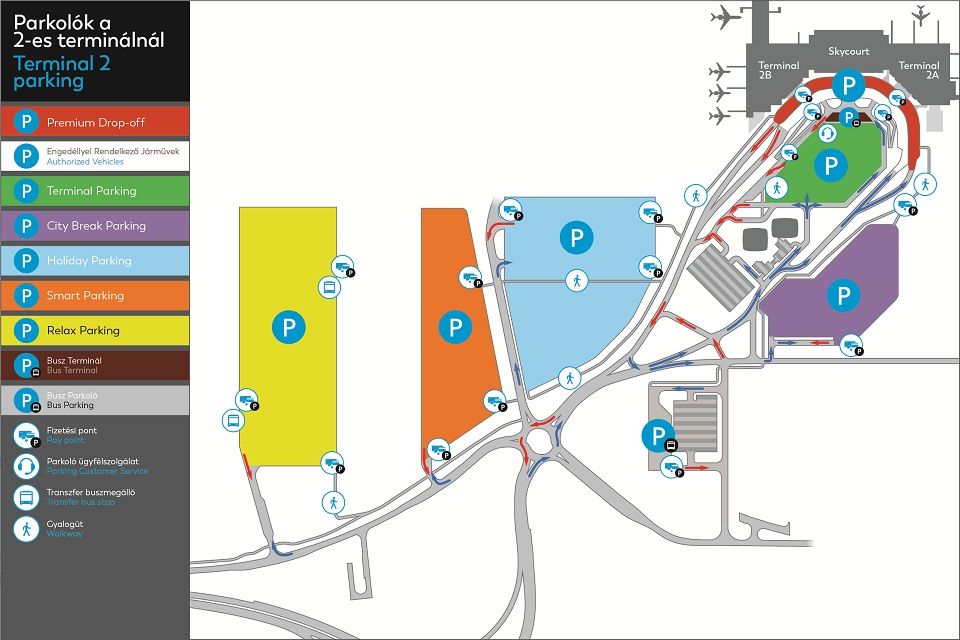
Cancellations: In case of a cancellation we will retain 10% of your booking price.
Bookings can be cancelled no later than 6 hours before entry to the car park.
Amendments: Booking amendment is free of charge.
Bookings can be modified no later than 6 hours before entry to the car park.
Vehicle restrictions: Vehicles longer than 6 meters or vehicles with a trailer cannot enter this car park.
Parking - frequently asked questions
Budapest Airport’s parking booking system is quick and easy to use. Below we have summarised some information that may be useful to our customers regarding parking and bookings.
- Booking a parking space online
- Financial details
- Managing my bookings
- What to do when entering and exiting the car park
- General parking information
Booking a parking space online
How far in advance can I book?
Parking spaces may be booked at least 6 (six) hours, but not earlier than 12 (twelve) months before the time of entry specified in the booking.
As a result of the booking, any price changes that may occur in the meantime do not apply to you.
What are the shortest and longest parking periods that can be pre-booked?
No booking can be made for a period of less than 24 (twenty-four) hours and more than 60 (sixty) days.
How is the parking fee calculated?
Parking fees apply for 24-hour periods. The number of “days” (24-hour periods) charged as part of a booking is calculated based on the dates and times specified during booking. If, however, the actual time of entry to or exit from the car park differs from the time indicated in advance, and, as a result, the parking period extends into an additional 24-hour period compared to the booking, the parking fee valid for that period in the given car park at that time is payable. Prices are in Hungarian forints and include VAT, at the applicable rate. Budapest Airport Zrt. does not charge any booking or card usage fees.
Why doesn’t the system give me an offer for a certain, preferred car park when I make a booking?
If the system does not give you an offer for a particular car park you have selected when you make your booking, it is likely that there are no parking spaces in that car park available for pre-booking, or the minimum parking period you have specified does not match the conditions of use of that car park.
What should I do if I do not receive the confirmation or an email containing it at the end of the booking process?
In this case, the booking was not successful and the process must be repeated.
If you have successfully made a booking online, but have not received the confirmation email, please check that your antivirus program is not blocking certain emails or classifying certain emails as spam.
Financial details
What payment methods are available?
Budapest Airport’s system accepts MasterCard, Maestro, Visa, Visa Electron and American Express credit cards.
How can I request a VAT invoice?
The online VAT invoice request can be initiated directly in the booking confirmation interface, by clicking on the VAT invoice request button and providing the necessary information for issuing the invoice (company name, company tax number, EU tax number, post code, settlement, address, e-mail address). If the customer fails to request an invoice in the booking confirmation interface, he/she can still request an invoice by e-mail, within 8 (eight) calendar days of the date of the successful completion of the booking, by sending the above data (booking confirmation nr., company name, company tax number, EU tax number, post code, settlement, address, e-mail address) by email to vatprebooking@bud.hu. Invoice requests received beyond 8 (eight) calendar days from the date of successful completion of the booking process will be rejected.
Managing my bookings
How can I be sure that my booking was successful?
Once your booking has been successfully completed, we will send you a confirmation e-mail, with your booking number. If you do not receive a confirmation e-mail, please log in and go to “Change booking” and check the confirmation from the system.
Please make a note of the booking number. This will allow you to check your booking in our system any time before you travel.
Can I cancel my booking if my travel plans change?
You can cancel your booking at least 6 hours prior to the time of entry to the car park, by using the “Change booking” button. In this case, depending on the conditions of the product you have chosen, we will refund a part of the parking fee. Certain products offering a significant discount are exceptions to this; these cannot be cancelled or changed.
Can I change my booking if my travel plans change?
You can change your booking at any time at least 6 hours prior to the time of entry to the car park, by using the “Change booking” button. In this case, depending on the conditions of the product you have chosen, a fee will be charged for the modification. Certain products offering a significant discount are exceptions to this; these cannot be cancelled or changed.
Please note that in the event of a change, the original booking is cancelled and a new confirmation is sent after the change has been successfully made.
Will a fee be charged if I change or cancel my booking?
Yes, if a booking is changed or cancelled, a fee corresponding to a percentage of the parking fee will be charged, which varies for each product. Please check the percentage fee for changing or cancelling the product before selecting it, by clicking on “More info”.
What to do when entering and exiting the car park
What should I do when I get to the entrance of the car park? When you arrive at the airport, please drive to the car park indicated in your booking. At the entrance barrier, wait a few seconds for the system to read and recognise your registration number and issue a parking ticket.
What should I do if I arrive at the car park with a vehicle with a different license plate number than the one indicated during booking, or if the system does not recognise the license plate number specified during booking?
If you arrive at the car park with a vehicle with a different license plate number than the one indicated during booking, or if the system does not recognise the license plate number specified, we recommend that you validate the QR code featured on the parking confirmation, either by scanning it with your mobile phone before the barrier or call the car park customer service directly (24/7), by pressing the telephone icon (request assistance).
If you are arriving in another vehicle and have the QR code, you do not need to change the license plate number in your booking.
What should I do when I return to the car park after my trip?
When exiting the car park, please insert the ticket received at the entrance into the machine at the exit and the barrier will open automatically.
What should I do if my car won’t start in the car park?
Please proceed to the Parking Customer Service in the middle of Terminal Parking and a parking attendant will do their best to help you.
What should I do if my flight is delayed on return?
If your flight is late and you exceed the exit time stated in your booking as a result, you will be charged a parking fee for the period beyond the time stated in your booking, based on the number of 24-hour periods, which will be equal to the parking fee valid in the given car park at that time.
What happens if I exit the car park and then return to it?
You can exit the car park at any time during the booking period, but we will not be able to refund the difference in the parking fee if you leave before the time of departure stated in your booking. If you re-enter the car park, you will be charged the parking fee valid in the given car park at the time of re-entry.
What if I return from my trip earlier than planned, for unforeseen reasons? Will the parking fee for the unused period be refunded?
If you arrive back at the car park before the time of departure stated in your booking, we will not be able to refund the parking fee for the unused period. The exit barrier will open automatically, as if you had left on the last day of your booking.
What happens if I arrive at the car park before the time of entry specified in my online booking?
The system recognises a booking up to 4 hours before the specified time of entry or up to 24 hours after the specified time of departure.
What should I do if my travel plans change, and I want to extend the parking period of my booking after entering the car park?
You can change your booking at least 6 hours prior to the time of entry to the car park. After this time, it is not possible to change the booking, e.g. to extend or cancel it.
What happens if an unforeseen problem arises on the day of my trip; for example, my flight is cancelled? Can my booking be cancelled or modified in this case?
You can change your booking at least 6 hours prior to the time of entry to the car park. After this time, it is not possible to change the booking, e.g. to extend or cancel it.
General parking information
What are the opening hours of the car parks?
All our car parks are open 24 hours day.
How do I find the car park indicated in my booking?
The confirmation document includes a map, showing the location of our car parks and the GPS coordinates of the entrances.
How is it possible to book a parking space for disabled people online?
Parking spaces for disabled people must be booked in the same way as for any other customer. When entering the car park specified in your booking, please drive to the part of the car park closest to the terminal building and look for the disabled parking spaces.
Are there restrictions on the types of vehicles in the car parks?
Vehicles using the car park must be no more than 6 metres long and must not be coupled to a trailer or tow.
How can I submit a complaint about the service?
Please send your complaint to the e-mail address of our car park customer service at parking@bud.hu.

Super Flex
- Budget parking!
- Guaranteed cheapest budget parking at 4-9 minute walk to the terminal.
- Flexible booking, amendment free of charge.
4-9 min(s)
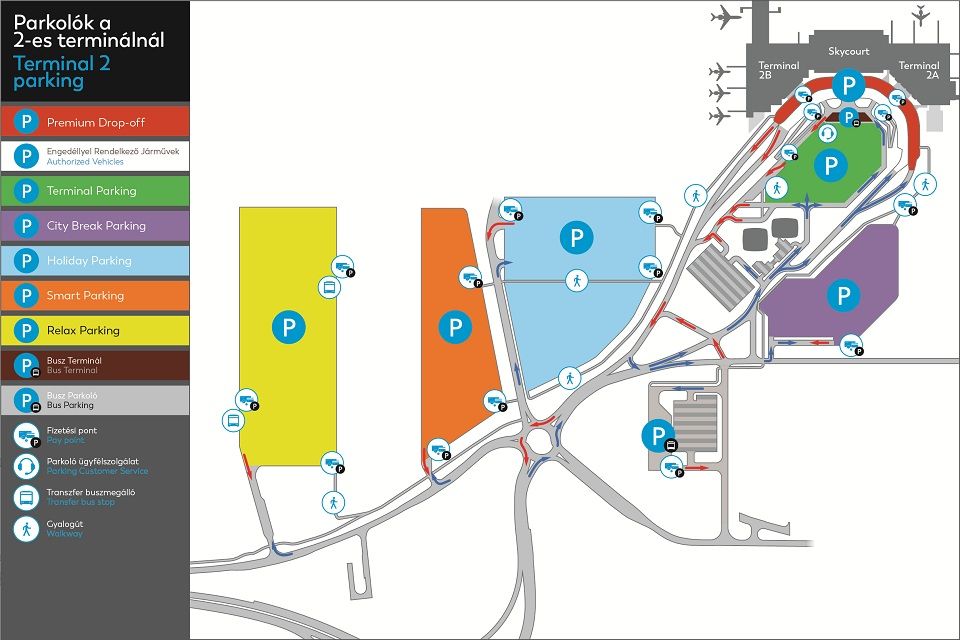
Cancellations: In case of a cancellation we will retain 20% of your booking price.
Bookings can be cancelled no later than 6 hours before entry to the car park.
Amendments: Booking amendment is free of charge.
Bookings can be modified no later than 6 hours before entry to the car park.
Vehicle restrictions: Vehicles longer than 6 meters or vehicles with a trailer cannot enter this car park.
Asphalted car park.
Parking - frequently asked questions
Budapest Airport’s parking booking system is quick and easy to use. Below we have summarised some information that may be useful to our customers regarding parking and bookings.
- Booking a parking space online
- Financial details
- Managing my bookings
- What to do when entering and exiting the car park
- General parking information
Booking a parking space online
How far in advance can I book?
Parking spaces may be booked at least 6 (six) hours, but not earlier than 12 (twelve) months before the time of entry specified in the booking.
As a result of the booking, any price changes that may occur in the meantime do not apply to you.
What are the shortest and longest parking periods that can be pre-booked?
No booking can be made for a period of less than 24 (twenty-four) hours and more than 60 (sixty) days.
How is the parking fee calculated?
Parking fees apply for 24-hour periods. The number of “days” (24-hour periods) charged as part of a booking is calculated based on the dates and times specified during booking. If, however, the actual time of entry to or exit from the car park differs from the time indicated in advance, and, as a result, the parking period extends into an additional 24-hour period compared to the booking, the parking fee valid for that period in the given car park at that time is payable. Prices are in Hungarian forints and include VAT, at the applicable rate. Budapest Airport Zrt. does not charge any booking or card usage fees.
Why doesn’t the system give me an offer for a certain, preferred car park when I make a booking?
If the system does not give you an offer for a particular car park you have selected when you make your booking, it is likely that there are no parking spaces in that car park available for pre-booking, or the minimum parking period you have specified does not match the conditions of use of that car park.
What should I do if I do not receive the confirmation or an email containing it at the end of the booking process?
In this case, the booking was not successful and the process must be repeated.
If you have successfully made a booking online, but have not received the confirmation email, please check that your antivirus program is not blocking certain emails or classifying certain emails as spam.
Financial details
What payment methods are available?
Budapest Airport’s system accepts MasterCard, Maestro, Visa, Visa Electron and American Express credit cards.
How can I request a VAT invoice?
The online VAT invoice request can be initiated directly in the booking confirmation interface, by clicking on the VAT invoice request button and providing the necessary information for issuing the invoice (company name, company tax number, EU tax number, post code, settlement, address, e-mail address). If the customer fails to request an invoice in the booking confirmation interface, he/she can still request an invoice by e-mail, within 8 (eight) calendar days of the date of the successful completion of the booking, by sending the above data (booking confirmation nr., company name, company tax number, EU tax number, post code, settlement, address, e-mail address) by email to vatprebooking@bud.hu. Invoice requests received beyond 8 (eight) calendar days from the date of successful completion of the booking process will be rejected.
Managing my bookings
How can I be sure that my booking was successful?
Once your booking has been successfully completed, we will send you a confirmation e-mail, with your booking number. If you do not receive a confirmation e-mail, please log in and go to “Change booking” and check the confirmation from the system.
Please make a note of the booking number. This will allow you to check your booking in our system any time before you travel.
Can I cancel my booking if my travel plans change?
You can cancel your booking at least 6 hours prior to the time of entry to the car park, by using the “Change booking” button. In this case, depending on the conditions of the product you have chosen, we will refund a part of the parking fee. Certain products offering a significant discount are exceptions to this; these cannot be cancelled or changed.
Can I change my booking if my travel plans change?
You can change your booking at any time at least 6 hours prior to the time of entry to the car park, by using the “Change booking” button. In this case, depending on the conditions of the product you have chosen, a fee will be charged for the modification. Certain products offering a significant discount are exceptions to this; these cannot be cancelled or changed.
Please note that in the event of a change, the original booking is cancelled and a new confirmation is sent after the change has been successfully made.
Will a fee be charged if I change or cancel my booking?
Yes, if a booking is changed or cancelled, a fee corresponding to a percentage of the parking fee will be charged, which varies for each product. Please check the percentage fee for changing or cancelling the product before selecting it, by clicking on “More info”.
What to do when entering and exiting the car park
What should I do when I get to the entrance of the car park? When you arrive at the airport, please drive to the car park indicated in your booking. At the entrance barrier, wait a few seconds for the system to read and recognise your registration number and issue a parking ticket.
What should I do if I arrive at the car park with a vehicle with a different license plate number than the one indicated during booking, or if the system does not recognise the license plate number specified during booking?
If you arrive at the car park with a vehicle with a different license plate number than the one indicated during booking, or if the system does not recognise the license plate number specified, we recommend that you validate the QR code featured on the parking confirmation, either by scanning it with your mobile phone before the barrier or call the car park customer service directly (24/7), by pressing the telephone icon (request assistance).
If you are arriving in another vehicle and have the QR code, you do not need to change the license plate number in your booking.
What should I do when I return to the car park after my trip?
When exiting the car park, please insert the ticket received at the entrance into the machine at the exit and the barrier will open automatically.
What should I do if my car won’t start in the car park?
Please proceed to the Parking Customer Service in the middle of Terminal Parking and a parking attendant will do their best to help you.
What should I do if my flight is delayed on return?
If your flight is late and you exceed the exit time stated in your booking as a result, you will be charged a parking fee for the period beyond the time stated in your booking, based on the number of 24-hour periods, which will be equal to the parking fee valid in the given car park at that time.
What happens if I exit the car park and then return to it?
You can exit the car park at any time during the booking period, but we will not be able to refund the difference in the parking fee if you leave before the time of departure stated in your booking. If you re-enter the car park, you will be charged the parking fee valid in the given car park at the time of re-entry.
What if I return from my trip earlier than planned, for unforeseen reasons? Will the parking fee for the unused period be refunded?
If you arrive back at the car park before the time of departure stated in your booking, we will not be able to refund the parking fee for the unused period. The exit barrier will open automatically, as if you had left on the last day of your booking.
What happens if I arrive at the car park before the time of entry specified in my online booking?
The system recognises a booking up to 4 hours before the specified time of entry or up to 24 hours after the specified time of departure.
What should I do if my travel plans change, and I want to extend the parking period of my booking after entering the car park?
You can change your booking at least 6 hours prior to the time of entry to the car park. After this time, it is not possible to change the booking, e.g. to extend or cancel it.
What happens if an unforeseen problem arises on the day of my trip; for example, my flight is cancelled? Can my booking be cancelled or modified in this case?
You can change your booking at least 6 hours prior to the time of entry to the car park. After this time, it is not possible to change the booking, e.g. to extend or cancel it.
General parking information
What are the opening hours of the car parks?
All our car parks are open 24 hours day.
How do I find the car park indicated in my booking?
The confirmation document includes a map, showing the location of our car parks and the GPS coordinates of the entrances.
How is it possible to book a parking space for disabled people online?
Parking spaces for disabled people must be booked in the same way as for any other customer. When entering the car park specified in your booking, please drive to the part of the car park closest to the terminal building and look for the disabled parking spaces.
Are there restrictions on the types of vehicles in the car parks?
Vehicles using the car park must be no more than 6 metres long and must not be coupled to a trailer or tow.
How can I submit a complaint about the service?
Please send your complaint to the e-mail address of our car park customer service at parking@bud.hu.

Super Flex
- Budget parking!
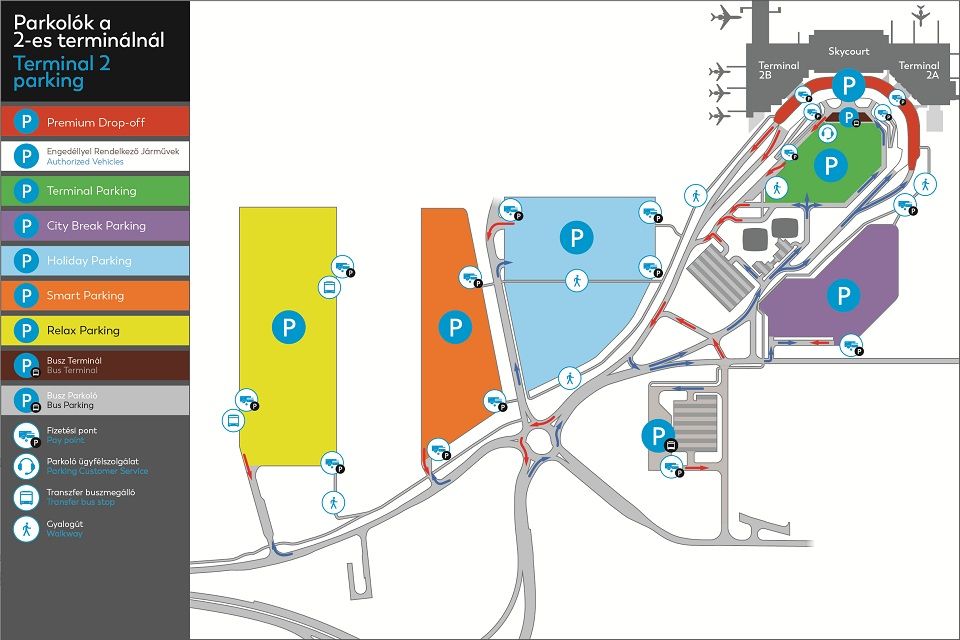
- Guaranteed cheapest budget parking at 8-10 minute walk to the terminal.
- Flexible booking, amendment free of charge.
8-10 min(s)
Cancellations: In case of a cancellation we will retain 20% of your booking price.
Bookings can be cancelled no later than 6 hours before entry to the car park.
Amendments: Booking amendment is free of charge.
Bookings can be modified no later than 6 hours before entry to the car park.
Vehicle restrictions: Vehicles longer than 6 meters or vehicles with a trailer cannot enter this car park.
Quality gravel car park with marked parking spaces and asphalted walkways.
Parking - frequently asked questions
Budapest Airport’s parking booking system is quick and easy to use. Below we have summarised some information that may be useful to our customers regarding parking and bookings.
- Booking a parking space online
- Financial details
- Managing my bookings
- What to do when entering and exiting the car park
- General parking information
Booking a parking space online
How far in advance can I book?
Parking spaces may be booked at least 6 (six) hours, but not earlier than 12 (twelve) months before the time of entry specified in the booking.
As a result of the booking, any price changes that may occur in the meantime do not apply to you.
What are the shortest and longest parking periods that can be pre-booked?
No booking can be made for a period of less than 24 (twenty-four) hours and more than 60 (sixty) days.
How is the parking fee calculated?
Parking fees apply for 24-hour periods. The number of “days” (24-hour periods) charged as part of a booking is calculated based on the dates and times specified during booking. If, however, the actual time of entry to or exit from the car park differs from the time indicated in advance, and, as a result, the parking period extends into an additional 24-hour period compared to the booking, the parking fee valid for that period in the given car park at that time is payable. Prices are in Hungarian forints and include VAT, at the applicable rate. Budapest Airport Zrt. does not charge any booking or card usage fees.
Why doesn’t the system give me an offer for a certain, preferred car park when I make a booking?
If the system does not give you an offer for a particular car park you have selected when you make your booking, it is likely that there are no parking spaces in that car park available for pre-booking, or the minimum parking period you have specified does not match the conditions of use of that car park.
What should I do if I do not receive the confirmation or an email containing it at the end of the booking process?
In this case, the booking was not successful and the process must be repeated.
If you have successfully made a booking online, but have not received the confirmation email, please check that your antivirus program is not blocking certain emails or classifying certain emails as spam.
Financial details
What payment methods are available?
Budapest Airport’s system accepts MasterCard, Maestro, Visa, Visa Electron and American Express credit cards.
How can I request a VAT invoice?
The online VAT invoice request can be initiated directly in the booking confirmation interface, by clicking on the VAT invoice request button and providing the necessary information for issuing the invoice (company name, company tax number, EU tax number, post code, settlement, address, e-mail address). If the customer fails to request an invoice in the booking confirmation interface, he/she can still request an invoice by e-mail, within 8 (eight) calendar days of the date of the successful completion of the booking, by sending the above data (booking confirmation nr., company name, company tax number, EU tax number, post code, settlement, address, e-mail address) by email to vatprebooking@bud.hu. Invoice requests received beyond 8 (eight) calendar days from the date of successful completion of the booking process will be rejected.
Managing my bookings
How can I be sure that my booking was successful?
Once your booking has been successfully completed, we will send you a confirmation e-mail, with your booking number. If you do not receive a confirmation e-mail, please log in and go to “Change booking” and check the confirmation from the system.
Please make a note of the booking number. This will allow you to check your booking in our system any time before you travel.
Can I cancel my booking if my travel plans change?
You can cancel your booking at least 6 hours prior to the time of entry to the car park, by using the “Change booking” button. In this case, depending on the conditions of the product you have chosen, we will refund a part of the parking fee. Certain products offering a significant discount are exceptions to this; these cannot be cancelled or changed.
Can I change my booking if my travel plans change?
You can change your booking at any time at least 6 hours prior to the time of entry to the car park, by using the “Change booking” button. In this case, depending on the conditions of the product you have chosen, a fee will be charged for the modification. Certain products offering a significant discount are exceptions to this; these cannot be cancelled or changed.
Please note that in the event of a change, the original booking is cancelled and a new confirmation is sent after the change has been successfully made.
Will a fee be charged if I change or cancel my booking?
Yes, if a booking is changed or cancelled, a fee corresponding to a percentage of the parking fee will be charged, which varies for each product. Please check the percentage fee for changing or cancelling the product before selecting it, by clicking on “More info”.
What to do when entering and exiting the car park
What should I do when I get to the entrance of the car park? When you arrive at the airport, please drive to the car park indicated in your booking. At the entrance barrier, wait a few seconds for the system to read and recognise your registration number and issue a parking ticket.
What should I do if I arrive at the car park with a vehicle with a different license plate number than the one indicated during booking, or if the system does not recognise the license plate number specified during booking?
If you arrive at the car park with a vehicle with a different license plate number than the one indicated during booking, or if the system does not recognise the license plate number specified, we recommend that you validate the QR code featured on the parking confirmation, either by scanning it with your mobile phone before the barrier or call the car park customer service directly (24/7), by pressing the telephone icon (request assistance).
If you are arriving in another vehicle and have the QR code, you do not need to change the license plate number in your booking.
What should I do when I return to the car park after my trip?
When exiting the car park, please insert the ticket received at the entrance into the machine at the exit and the barrier will open automatically.
What should I do if my car won’t start in the car park?
Please proceed to the Parking Customer Service in the middle of Terminal Parking and a parking attendant will do their best to help you.
What should I do if my flight is delayed on return?
If your flight is late and you exceed the exit time stated in your booking as a result, you will be charged a parking fee for the period beyond the time stated in your booking, based on the number of 24-hour periods, which will be equal to the parking fee valid in the given car park at that time.
What happens if I exit the car park and then return to it?
You can exit the car park at any time during the booking period, but we will not be able to refund the difference in the parking fee if you leave before the time of departure stated in your booking. If you re-enter the car park, you will be charged the parking fee valid in the given car park at the time of re-entry.
What if I return from my trip earlier than planned, for unforeseen reasons? Will the parking fee for the unused period be refunded?
If you arrive back at the car park before the time of departure stated in your booking, we will not be able to refund the parking fee for the unused period. The exit barrier will open automatically, as if you had left on the last day of your booking.
What happens if I arrive at the car park before the time of entry specified in my online booking?
The system recognises a booking up to 4 hours before the specified time of entry or up to 24 hours after the specified time of departure.
What should I do if my travel plans change, and I want to extend the parking period of my booking after entering the car park?
You can change your booking at least 6 hours prior to the time of entry to the car park. After this time, it is not possible to change the booking, e.g. to extend or cancel it.
What happens if an unforeseen problem arises on the day of my trip; for example, my flight is cancelled? Can my booking be cancelled or modified in this case?
You can change your booking at least 6 hours prior to the time of entry to the car park. After this time, it is not possible to change the booking, e.g. to extend or cancel it.
General parking information
What are the opening hours of the car parks?
All our car parks are open 24 hours day.
How do I find the car park indicated in my booking?
The confirmation document includes a map, showing the location of our car parks and the GPS coordinates of the entrances.
How is it possible to book a parking space for disabled people online?
Parking spaces for disabled people must be booked in the same way as for any other customer. When entering the car park specified in your booking, please drive to the part of the car park closest to the terminal building and look for the disabled parking spaces.
Are there restrictions on the types of vehicles in the car parks?
Vehicles using the car park must be no more than 6 metres long and must not be coupled to a trailer or tow.
How can I submit a complaint about the service?
Please send your complaint to the e-mail address of our car park customer service at parking@bud.hu.

Super Flex
- Budget parking!
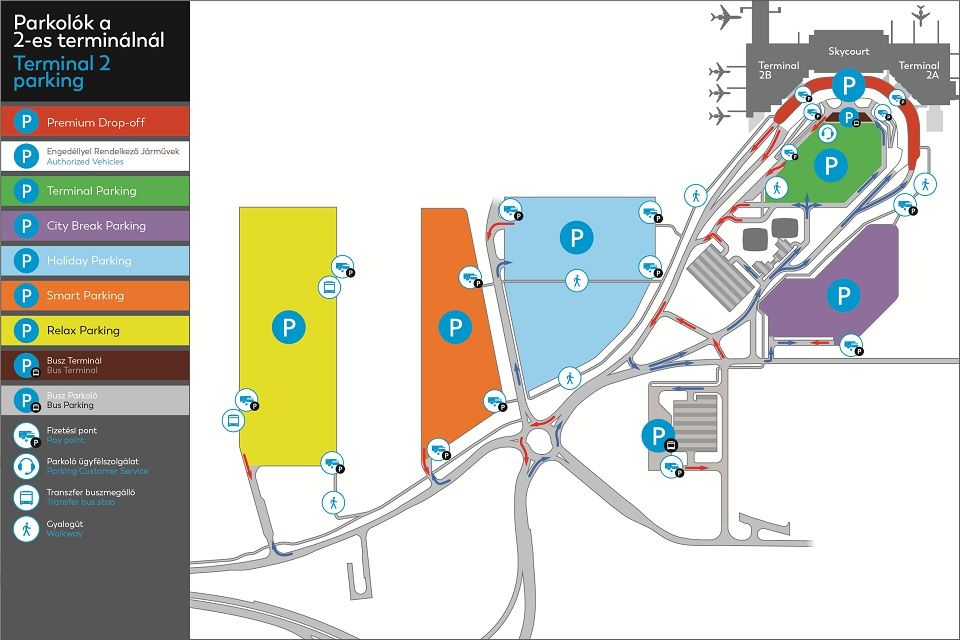
- Free transfer bus to the terminal!
- Flexible booking, amendment free of charge.
 8-10 min(s)
Cancellations: In case of a cancellation we will retain 20% of your booking price.
Bookings can be cancelled no later than 6 hours before entry to the car park.
Amendments: Booking amendment is free of charge.
Bookings can be modified no later than 6 hours before entry to the car park.
Vehicle restrictions: Vehicles longer than 6 meters or vehicles with a trailer cannot enter this car park.
Parking - frequently asked questions
Budapest Airport’s parking booking system is quick and easy to use. Below we have summarised some information that may be useful to our customers regarding parking and bookings.
- Booking a parking space online
- Financial details
- Managing my bookings
- What to do when entering and exiting the car park
- General parking information
Booking a parking space online
How far in advance can I book?
Parking spaces may be booked at least 6 (six) hours, but not earlier than 12 (twelve) months before the time of entry specified in the booking.
As a result of the booking, any price changes that may occur in the meantime do not apply to you.
What are the shortest and longest parking periods that can be pre-booked?
No booking can be made for a period of less than 24 (twenty-four) hours and more than 60 (sixty) days.
How is the parking fee calculated?
Parking fees apply for 24-hour periods. The number of “days” (24-hour periods) charged as part of a booking is calculated based on the dates and times specified during booking. If, however, the actual time of entry to or exit from the car park differs from the time indicated in advance, and, as a result, the parking period extends into an additional 24-hour period compared to the booking, the parking fee valid for that period in the given car park at that time is payable. Prices are in Hungarian forints and include VAT, at the applicable rate. Budapest Airport Zrt. does not charge any booking or card usage fees.
Why doesn’t the system give me an offer for a certain, preferred car park when I make a booking?
If the system does not give you an offer for a particular car park you have selected when you make your booking, it is likely that there are no parking spaces in that car park available for pre-booking, or the minimum parking period you have specified does not match the conditions of use of that car park.
What should I do if I do not receive the confirmation or an email containing it at the end of the booking process?
In this case, the booking was not successful and the process must be repeated.
If you have successfully made a booking online, but have not received the confirmation email, please check that your antivirus program is not blocking certain emails or classifying certain emails as spam.
Financial details
What payment methods are available?
Budapest Airport’s system accepts MasterCard, Maestro, Visa, Visa Electron and American Express credit cards.
How can I request a VAT invoice?
The online VAT invoice request can be initiated directly in the booking confirmation interface, by clicking on the VAT invoice request button and providing the necessary information for issuing the invoice (company name, company tax number, EU tax number, post code, settlement, address, e-mail address). If the customer fails to request an invoice in the booking confirmation interface, he/she can still request an invoice by e-mail, within 8 (eight) calendar days of the date of the successful completion of the booking, by sending the above data (booking confirmation nr., company name, company tax number, EU tax number, post code, settlement, address, e-mail address) by email to vatprebooking@bud.hu. Invoice requests received beyond 8 (eight) calendar days from the date of successful completion of the booking process will be rejected.
Managing my bookings
How can I be sure that my booking was successful?
Once your booking has been successfully completed, we will send you a confirmation e-mail, with your booking number. If you do not receive a confirmation e-mail, please log in and go to “Change booking” and check the confirmation from the system.
Please make a note of the booking number. This will allow you to check your booking in our system any time before you travel.
Can I cancel my booking if my travel plans change?
You can cancel your booking at least 6 hours prior to the time of entry to the car park, by using the “Change booking” button. In this case, depending on the conditions of the product you have chosen, we will refund a part of the parking fee. Certain products offering a significant discount are exceptions to this; these cannot be cancelled or changed.
Can I change my booking if my travel plans change?
You can change your booking at any time at least 6 hours prior to the time of entry to the car park, by using the “Change booking” button. In this case, depending on the conditions of the product you have chosen, a fee will be charged for the modification. Certain products offering a significant discount are exceptions to this; these cannot be cancelled or changed.
Please note that in the event of a change, the original booking is cancelled and a new confirmation is sent after the change has been successfully made.
Will a fee be charged if I change or cancel my booking?
Yes, if a booking is changed or cancelled, a fee corresponding to a percentage of the parking fee will be charged, which varies for each product. Please check the percentage fee for changing or cancelling the product before selecting it, by clicking on “More info”.
What to do when entering and exiting the car park
What should I do when I get to the entrance of the car park? When you arrive at the airport, please drive to the car park indicated in your booking. At the entrance barrier, wait a few seconds for the system to read and recognise your registration number and issue a parking ticket.
What should I do if I arrive at the car park with a vehicle with a different license plate number than the one indicated during booking, or if the system does not recognise the license plate number specified during booking?
If you arrive at the car park with a vehicle with a different license plate number than the one indicated during booking, or if the system does not recognise the license plate number specified, we recommend that you validate the QR code featured on the parking confirmation, either by scanning it with your mobile phone before the barrier or call the car park customer service directly (24/7), by pressing the telephone icon (request assistance).
If you are arriving in another vehicle and have the QR code, you do not need to change the license plate number in your booking.
What should I do when I return to the car park after my trip?
When exiting the car park, please insert the ticket received at the entrance into the machine at the exit and the barrier will open automatically.
What should I do if my car won’t start in the car park?
Please proceed to the Parking Customer Service in the middle of Terminal Parking and a parking attendant will do their best to help you.
What should I do if my flight is delayed on return?
If your flight is late and you exceed the exit time stated in your booking as a result, you will be charged a parking fee for the period beyond the time stated in your booking, based on the number of 24-hour periods, which will be equal to the parking fee valid in the given car park at that time.
What happens if I exit the car park and then return to it?
You can exit the car park at any time during the booking period, but we will not be able to refund the difference in the parking fee if you leave before the time of departure stated in your booking. If you re-enter the car park, you will be charged the parking fee valid in the given car park at the time of re-entry.
What if I return from my trip earlier than planned, for unforeseen reasons? Will the parking fee for the unused period be refunded?
If you arrive back at the car park before the time of departure stated in your booking, we will not be able to refund the parking fee for the unused period. The exit barrier will open automatically, as if you had left on the last day of your booking.
What happens if I arrive at the car park before the time of entry specified in my online booking?
The system recognises a booking up to 4 hours before the specified time of entry or up to 24 hours after the specified time of departure.
What should I do if my travel plans change, and I want to extend the parking period of my booking after entering the car park?
You can change your booking at least 6 hours prior to the time of entry to the car park. After this time, it is not possible to change the booking, e.g. to extend or cancel it.
What happens if an unforeseen problem arises on the day of my trip; for example, my flight is cancelled? Can my booking be cancelled or modified in this case?
You can change your booking at least 6 hours prior to the time of entry to the car park. After this time, it is not possible to change the booking, e.g. to extend or cancel it.
General parking information
What are the opening hours of the car parks?
All our car parks are open 24 hours day.
How do I find the car park indicated in my booking?
The confirmation document includes a map, showing the location of our car parks and the GPS coordinates of the entrances.
How is it possible to book a parking space for disabled people online?
Parking spaces for disabled people must be booked in the same way as for any other customer. When entering the car park specified in your booking, please drive to the part of the car park closest to the terminal building and look for the disabled parking spaces.
Are there restrictions on the types of vehicles in the car parks?
Vehicles using the car park must be no more than 6 metres long and must not be coupled to a trailer or tow.
How can I submit a complaint about the service?
Please send your complaint to the e-mail address of our car park customer service at parking@bud.hu.